Monday, May 11, 2009

Brushes in Photoshop Elements

As I have looked around at various blogs and digi-scrapping websites I have noticed that a lot of people's favorite device is "brushes" for altering their photographs, making pretty papers, and neat looking embellishments. And I have been asking myself, "what the heck are brushes?" for weeks now. I have read various people's descriptions of what brushes are and it has still been slow to sink in exactly what they are talking about, although along the way I have at least figured out how to find them in Photoshop Elements.

Well another problem I have run into is that I have Photoshop Elements, not Photoshop, and there are not many tutorials for Photoshop Elements. So I have not been sure when reading directions on brushes if they actually apply to Photoshop Elements or not. So, I have finally found a tutorial which actually explains what brushes ARE and not just how to use them and is specific to Photoshop Elements.

If you are wondering what brushes are too then you need to read this tutorial from ScrapGirls.com: http://www.scrapgirls.com/how_to_use_brushes_in_Photoshop_Elements_PSE.htm

Saturday, May 9, 2009

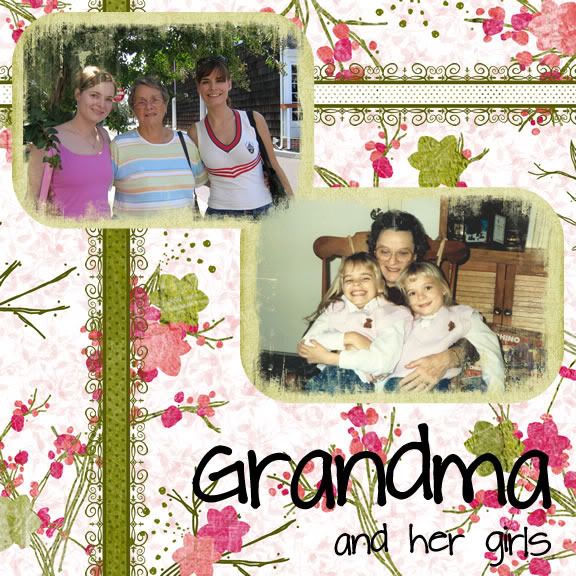
Grandma and Her Girls

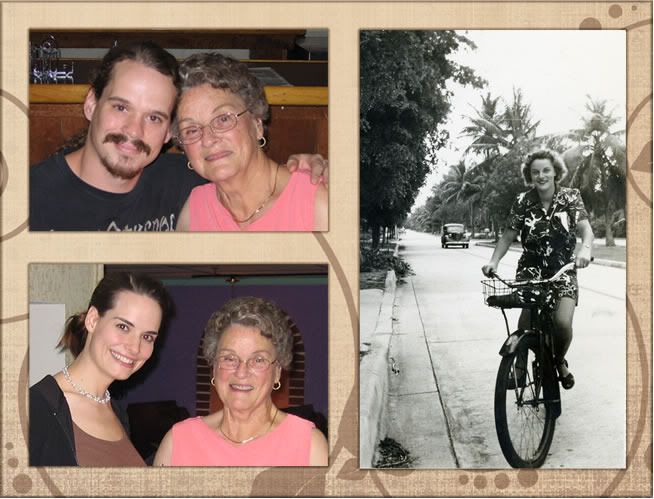
Last week my grandma passed away. My twin sister and I were her only granddaughters and we had a special relationship with her. She was an incredible woman that we loved so very much. The pictures here are from 1985 and 2007.

It was with a heavy heart that I put together this scrapbook page. Her memory will live on.

Love you, Grandma.

Grandma & Her Girls
"Grandma & Her Girls"
Lillian Herbrandt Stiefel
Nov. 2, 1923 - Apr. 28, 2009

Papers and Elements: Summer Driggs' Sweet Springtime Kit
Mask: Photo Mask #1 by Gunhild Storeide
Font: Pea Charmaine from KevinandAmanda.com


Picture frame of Grandma
Top Left: Ryan and Grandma (Aug. 2005);
Right: Grandma (1940s, Miami, Fla.) (I just love this picture!);
Bottom Left: Elise and Grandma (Aug. 2005)

Frame: Mad Genius Designs (Jewel Goodwin)

First Layout Using Photoshop Elements

Today, over at Simple Scrapper, there are great directions on how to create your first layout in Adobe Photoshop Elements.

Check it out: http://www.simplescrapper.com/2009/05/09/you-asked-about-getting-started/

Friday, May 8, 2009

Using Photoshop Brushes to Make Overlays and Papers

Lynn Clifford posted a great introductory tutorial on using brushes in Photoshop. Check it out!

Visit Bella Scraps Magazine here:
http://bellascraps.com/?p=803

Saturday, May 2, 2009

Happy National Scrapbooking Day!


Happy National Scrapbooking Day!

enjoy all of the freebies and great buys!